OneSpan Sign for Salesforce
Keep agreements moving without leaving Salesforce. OneSpan Sign's Salesforce eSignature integration lets your teams prepare, send, sign, and track agreements directly from Salesforce.
Whether you're closing deals, onboarding customers, or managing service contracts, you can automate signature workflows while maintaining enterprise-grade security and compliance.


Why OneSpan Sign for Salesforce matters
With the OneSpan Sign eSignature integration for Salesforce, teams can prepare, send, track, sign, and store agreements directly in Salesforce, while supporting the security, auditability, and identity assurance requirements of regulated workflows. Explore how this embedded integration supports your team:

Increase productivity
Gain greater visibility
Streamline experiences
Improve trust & compliance
Get started quickly

Automate agreement preparation
Use Salesforce data, reusable templates, drag-and-drop preparation, and custom buttons to reduce repetitive setup work.

Keep Salesforce records in sync
Sync signer-entered data back to Salesforce records and attach completed documents and evidence summaries to the right Salesforce objects.

Track every agreement in Salesforce
Monitor signing status, use automated reminders, and keep teams informed with Salesforce notifications.

Support secure, compliant eSignatures
Apply identity verification, authentication options, embedded audit trails, and tamper-evident signatures to support high-trust workflows.

Customize to your Salesforce workflows
Use standard or custom objects, permission sets, templates, text tags, APIs, and the OneSpan Apex SDK to support your business processes.
Latest feature updates & enhancements
Key features and updates
- Auto-populate documents with Salesforce data
- Sync signer-entered data back into Salesforce records
- Configure SMS notifications and authentication options from Salesforce
- Automatically attach signed documents and evidence summaries to Salesforce objects
How OneSpan Sign for Salesforce works
-
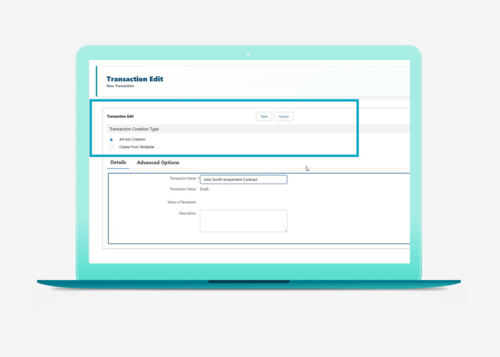
Step 01
Start a transaction
In the opportunity, select the transactions section. Create a transaction ad hoc or from a template. Templates can be built directly in Salesforce. -
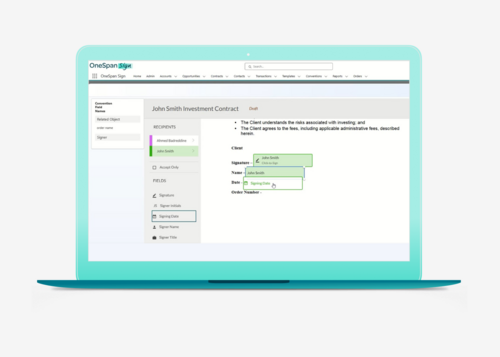
Step 02
Add signers
Select contracts from Salesforce and assign roles, labels, and routing. -
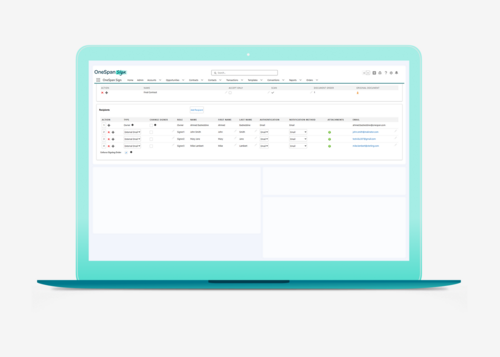
Step 03
Send for signature
Send the agreement from Salesforce. Signers receive an email or SMS notification prompting them to sign. -
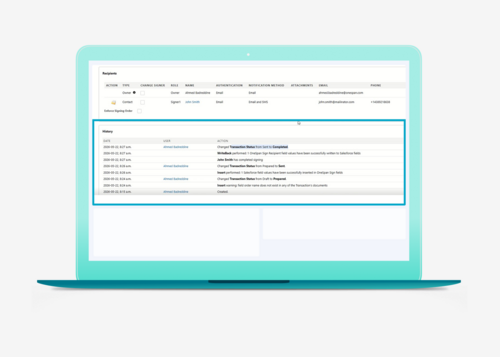
Step 04
Track status
Monitor the status of the transaction in Salesforce so teams can see where each transaction stands. -
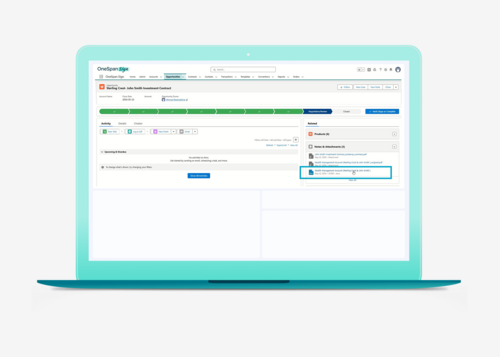
Step 05
Stop manually archiving
Once signing is complete, the signed document and audit trail are automatically returned to Salesforce and stored with the transaction record. -
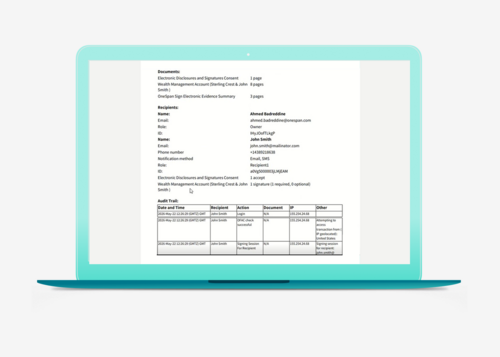
Step 06
Access the audit trail
If needed, access the audit trail in the Transaction section. It provides a detailed overview of the full signing process.


Use cases
Automate the digital agreement workflows that matter most – without leaving Salesforce

Customer & agent onboarding
- Account opening
- Client & agent onboarding
- Customer & agent enrollment
- Account maintenance requests

Lending & financing
- Account opening & loan application
- Repayment schedule confirmation, recurring payments velocity/ changes
- Borrower consents & disclosures
- Loan servicing

Wealth management
- New account opening
- Client onboarding
- Advisory agreements
- Investment account documentation
- Account maintenance requests

Insurance
- New policy application
- Quotes & quote renewals
- Cancel insurance policy
- Address, billing cycle & beneficiary change

Sales agreements
- Quotes and proposals
- Sales contracts
- Statements of work (SOWs)
- Service level agreements (SLAs)
- Non-disclosure agreements (NDAs)

Vendor & procurement processes
- Vendor onboarding
- Supplier agreements
- Purchase orders and warranties
- Procurement approvals
- Change orders
Lending spotlight
Accelerate loan approvals and funding, all within Salesforce

OneSpan Sign helps lenders streamline borrower onboarding, accelerate loan processing, and manage lending agreements directly in Salesforce.
Loan officers can securely send and sign documents without leaving Salesforce, capture borrower information during the signing process, and automatically synchronize data back to Salesforce in real time.
With advanced identity verification, comprehensive audit trails, and flexible signing options, OneSpan Sign helps financial services organizations deliver a seamless borrower experience, reduce risk, and support compliance.
Business outcomes
Accelerate loan approvals and funding with electronic signing
Eliminate manual data entry: Sync borrower data back to Salesforce
Simplify lending and auto finance workflows
Strengthen compliance with identity verification and audit trails
What our customers say

Setup in 3 steps
Get up and running with eSignatures in minutes, with little-to-no IT involvement
Start streamlining agreement workflows in 3 steps:
Install the managed package
Download OneSpan Sign for Salesforce from Salesforce AppExchange
Configure workflow settings
Set up templates, authentication options, notifications, and routing rules
Connect to Salesforce records
Attach documents, contracts, and agreements to standard or custom Salesforce objects and start sending for signature

For Salesforce admins
Deploy, configure, and manage OneSpan Sign using familiar Salesforce tools and controls


Fast deployment
Install OneSpan Sign as a managed package from Salesforce AppExchange and get started quickly with minimal IT involvement. Support for Salesforce Sales Cloud helps accelerate deployment across teams.
Flexible configuration
Configure templates, field mappings, authentication requirements, notifications, and workflows to align with your business processes. Support standard Salesforce objects and custom objects to fit your organization's needs.
Secure administration
Manage access through Salesforce permission sets and administrative controls. Apply identity verification methods, monitor transaction activity, and maintain tamper-evident audit trails for every agreement.
Extend with Salesforce tools
Use custom buttons, text tags, templates, APIs, and the OneSpan Apex SDK to embed eSignature workflows into custom Salesforce applications and automated business processes.
Why Salesforce admins choose OneSpan Sign
Managed AppExchange package
No-code workflow automation
Standard and custom object support
Salesforce permission set integration
Automatic archiving of signed agreements and audit trails
Security & compliance
Apply the right level of security, authentication, and compliance controls for every signing transaction

Advanced ID verification & authentication
Verify signer identities using flexible identity verification and authentication options. Your team can choose the level of assurance appropriate for each transaction, including document-based identity verification with AI-powered authenticity checks, biometric selfie matching, and liveness detection.

Compliance & auditability
Maintain complete visibility into every agreement transaction. OneSpan Sign helps you support compliance requirements with detailed audit trails and tamper-evident records. Every agreement includes evidence of who signed, when, and the authentication methods used throughout the process.

Secure-by-design workflows
Protect sensitive information while maintaining a seamless, white-labeled user experience. OneSpan Sign enables organizations to securely send, sign, store, and manage agreements directly within Salesforce, helping reduce risk and eliminate manual processes that can introduce compliance gaps.
Resources


Frequently asked questions
- What is OneSpan Sign for Salesforce?
OneSpan Sign for Salesforce is an out-of-the-box eSignature integration that helps teams prepare, send, track, and manage agreements from Salesforce. It streamlines document signing in the CRM so teams can improve productivity, keep agreement data connected to Salesforce records, and support auditability.
- What is an embedded integration?
An embedded integration brings eSignature functionality directly into a business application such as Salesforce. Users can prepare, send, track, and manage agreements without leaving the application, while agreement data remains connected to their existing workflows and records.
- How does OneSpan Sign integrate with Salesforce?
OneSpan Sign is installed as a managed Salesforce package that embeds agreement workflows directly within Salesforce. Users can prepare, send, track, and manage agreements from Salesforce records while keeping agreement data connected to existing CRM workflows.
- Can I send documents for signature without leaving Salesforce?
Yes. OneSpan Sign allows users to create transactions, add recipients, monitor status, and access completed agreements directly within Salesforce. This reduces the need to switch between applications and helps teams maintain visibility into agreement activity.
- Which Salesforce objects are supported?
OneSpan Sign can be used with standard Salesforce Sales Cloud objects such as Accounts, Contacts, Opportunities, Cases, and Quotes. Organizations can also configure the integration to support custom objects.
- What information is synced or stored in Salesforce?
Completed agreements, transaction status, signer activity, and audit information are automatically associated with Salesforce records. This helps teams maintain visibility into the agreement process while keeping important documents connected to customer records.
- Can Salesforce data automatically populate documents?
Yes. Salesforce data can automatically populate document fields, reducing manual data entry and helping keep information accurate and consistent throughout the agreement process.
- Can I customize OneSpan Sign to match my Salesforce workflows?
Yes. OneSpan Sign can be configured to align with Salesforce business processes, including custom objects, field mappings, templates, recipient roles, page layouts, and workflow requirements. Administrators can also assign licenses, permission sets, and access controls to manage who can create, send, and manage agreements.
- Does OneSpan Sign for Salesforce support multiple signers and signing order?
Yes. OneSpan Sign supports multiple signers and configurable signing workflows. Workflows can accommodate multiple recipients with sequential or parallel signing logic, send SMS notifications to each signer, and change signers depending on business requirements. Signers can be part of salesforce contact or someone who is not part of salesforce contact list.
- What identity verification options are available in OneSpan Sign for Salesforce?
OneSpan Sign supports multiple identity verification methods, including SMS authentication, knowledge-based authentication, and document-based identity verification with biometric verification and liveness detection. Organizations can select the level of identity assurance appropriate for each workflow.
- How does OneSpan Sign support auditability and compliance?
OneSpan Sign helps organizations track and store signed documents with their embedded audit trail in Salesforce. The audit trail provides a detailed overview of the signing process, including who signed the document, when it was signed, and any modifications made.
- What do I need to get started with OneSpan Sign for Salesforce?
To get started, organizations need a supported Salesforce edition, Salesforce System Administrator access, a OneSpan Sign enterprise account (sandbox and production), and installation through the AppExchange managed package with license assignment and permission set deployment.
- How long does it take to get started?
After installing the OneSpan Sign package and connecting the account, administrators can configure templates, field mappings, notifications, and optional identity verification workflows directly within Salesforce.
