What is a digital signature?
Digital signatures utilize a set of accepted standards called Public Key Infrastructure (PKI) and support electronic signatures to deliver a legally binding and secure method of signing documents. The increased adoption of digital signatures means that businesses must ensure their agreement processes are compliant. Legal and regulatory requirements vary globally and by use case. Choosing the right vendor can take care of most of the compliance burden.
OneSpan Sign is a leading e-signature solution built on digital signature technology that can help you to meet geographic requirements, such as those outlined in the European Union’s eIDAS regulation, as well as industry-specific requirements in regulated industries, such as Financial Services, Government, and Healthcare
What is the difference between electronic signature and digital signature?
What's the distinction?
“Electronic signatures” and “digital signatures” are often used interchangeably but each term carries a distinct set of defining features and functions. The broader category of e-signatures often includes digital signatures, which is a specific type of technology used to implement electronic signatures.
More specifically, an electronic signature is, like its ink equivalent on paper documents, a legal concept. Its purpose is to capture a person’s intent to be legally bound to an agreement or contract in the form of a digital document or electronic document and as part of a paperless process.
A digital signature, on the other hand, is not a different type of electronic signature. It refers to encryption/decryption technology and a subset of an electronic signature. Based on public-key cryptography (as opposed to private key), which generates two keys (public and private) using cryptographic mathematical algorithms, digital signatures secure signed documents and allow one to verify the authenticity of a signed record. A digital signature alone however is not an e-signature and therefore cannot capture a person’s intent to sign a document. When used with an e-signing application, digital signature technology secures the e-signed data. The confusion comes when terms like “digital signing” blend the two terms colloquially.
What's the solution?
A solution that simply digitally signs documents often lacks feature sets commonly found in best-in-class eSignature solutions, including an out-of-the-box user interface (UI), as well as transaction management and advanced document workflow customization capabilities used in more complex transactions that touch the customer.
The bottom line is that when looking for a solution to manage your signing processes, it’s important to ensure that it is built on digital signature technology to guarantee the integrity of the document and underlying signatures. Without the use of digital signatures, your document-based transactions may not be legally binding, putting you and your organization at risk in the event of a compliance audit or legal case.
How do digital signatures work? The e-signature process
OneSpan Sign handles all aspects of the signing process – from collecting consent to delivering and storing the e-signed document and detailed audit trail of the transaction. Our solution is managed with security, compliance, and long-term verifiability in mind. Customers gain peace of mind knowing that their documents are secure throughout their lifecycle. The following table highlights the key steps in the document signing process:

Consent
Signer consents to the use of e‑signatures and e‑documents

Intent
Click, type or draw action to sign at a specified location

Identity Proofing
Identification and authentication methods verify the signer’s identity in order to allow them to access the documents and sign

Digitally Sign
Binds the certificate, user identity and audit trail to signed data

Verify
Verify document, identity, time/date, audit trails with PDF reader

Audit
Vendor-independent audit trails that capture events proving how the signer was identified, what they signed, when, and where.

Store
Documents stored in a repository or the customer's desired system of record
A deeper dive on digital signatures
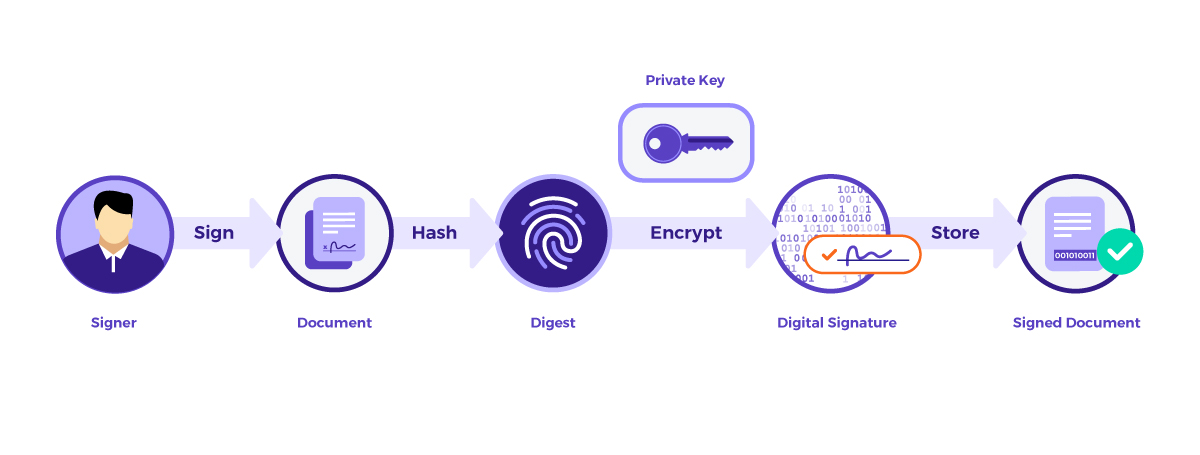
OneSpan Sign computes one digital signature for each electronic signature in a document and stores these digital signatures in accordance with the ISO 32000 standard. OneSpan Sign first computes an electronic “fingerprint” or digest of the document using the SHA-256 hashing algorithm. This fingerprint or hash function, uniquely represents the document. OneSpan Sign then uses asymmetric encryption to encrypt the fingerprint to create a digital signature before embedding it in the document.
In order to verify the integrity of the document and signature, you need to decrypt the digital signature. The PDF standard does this by allowing services like OneSpan Sign to store a copy of the public key in the signed document.
Additional audit data
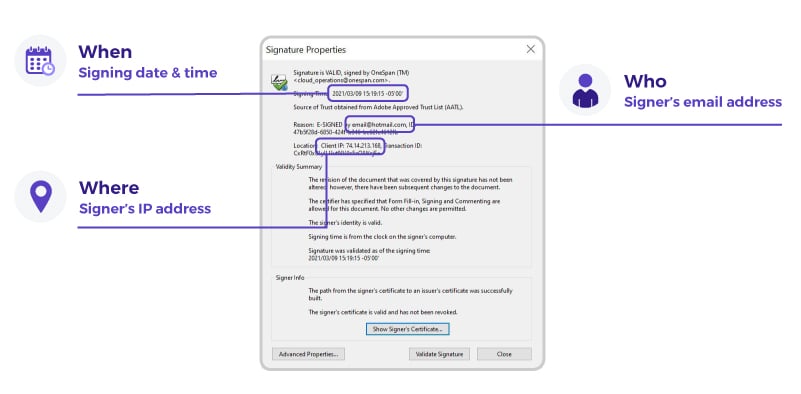
The PDF standard also allows for a timestamp to be stored with each digital signature. OneSpan Sign computes and stores timestamps with more information than is required by standards. This includes the email address of the signer, a unique identifier associated with the signer, a unique identifier associated with the overall transaction, as well as the IP address. Data is stored in a way that is visible to the user at verification time.
Subsequent digital signatures
Subsequent digital signatures are computed in the same way, however every time a new digital signature is applied to the document, the hashed data includes the entire document, updated changes (i.e., completed form fields), as well as the previous digital signatures themselves. See the figure below.
Verifying digital signatures
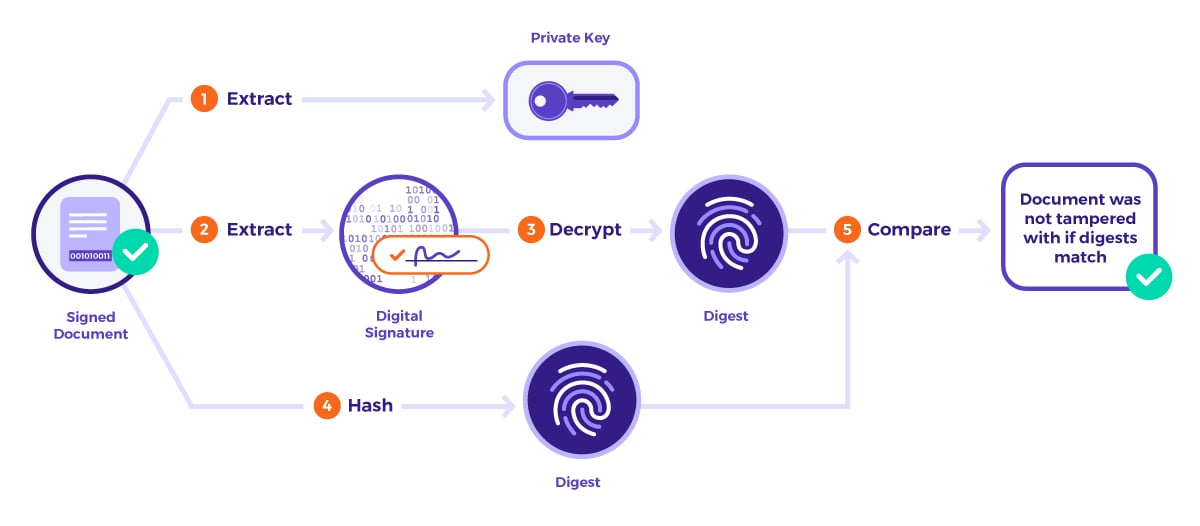
The process of verifying digital signatures is the reverse of the process to compute them. The process is completed automatically by most PDF viewers and begins by extracting the public key, as well as the corresponding digital signature in the signed document. The viewer then decrypts the digital signature in order to obtain the document’s fingerprint or digest. Afterwards, the viewer computes its own fingerprint using the current state of the document. If both fingerprints match, it means that the document was not modified since the digital signature was applied.
How to confirm the validity of a signed document
Confirming the validity of a signed document requires only a PDF viewer that is compatible with the PDF standard. The PDF viewer is capable of finding digital signatures in a document and verifying their validity. Open the signed document and either click on one of the signature blocks or open the Signature Panel.
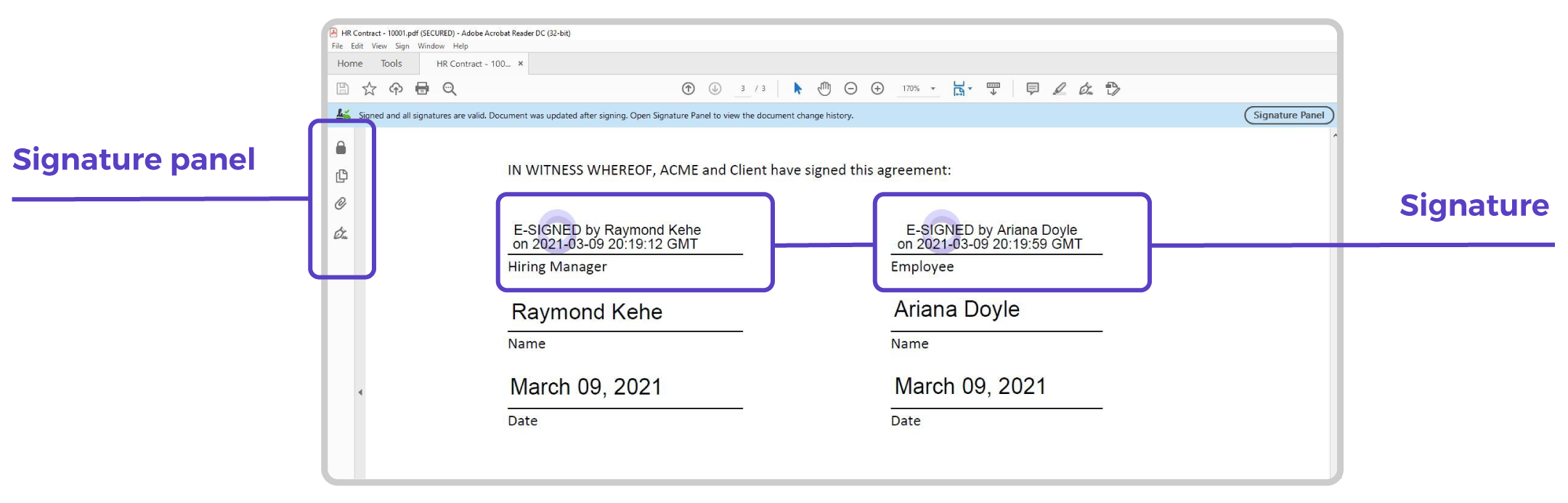
By clicking a signature block, the PDF viewer verifies the validity of the corresponding digital signature. It then displays the result of the verification.
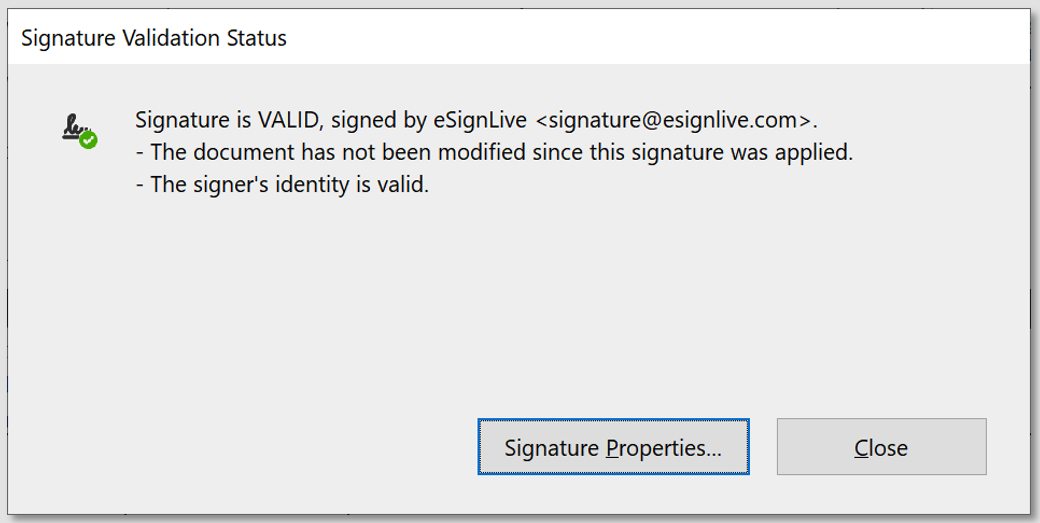
Because OneSpan Sign computes a digital signature for each electronic signature in the document, you can access information that is specific to the signature that was clicked via the Signature Properties dialog. This dialog shows exactly when this specific signature was applied by the signer, the email address of the signer, and their IP address.
The OneSpan Sign Difference
E-Signature Pioneer
25 years of electronic and digital signature experience and innovation to ensure you can achieve the highest completion rates for your signing processes.
Global E-Sign Laws and Regulations
Out-of-the-box support for compliance with the ESIGN Act (US), eIDAS (EU), ZertES (Switzerland), Electronic Transactions Act (Australia), and many more.
An Enterprise-Grade Solution that Scales with Your Needs
The only solution to provide a unified platform and integration framework that maintains high security, compliance and performance everywhere in the world.
Standards-Based Signing
Supports a broad range of local- and server-side signing certificates that adhere to global standards; instant interoperability with X.509 certificates issued by any TSP in Europe; support for signing with certificates stored on U.S. government Common Access Cards (CAC) and PIV (Personal Identity Verification) cards.
Wide Range of Deployment Options
Deploy OneSpan Sign in a public cloud, private cloud or on-premises behind your firewall; fulfill in-country data residency requirements with global data centers
Security & Trust are at the Heart of our Business
OneSpan is a global leader in digital security and e-signature solutions. We believe that our 25+ years of experience in the IT security segment is a real asset to our employees, partners and customers – who can transact digitally using our solutions with trust and confidence.
The information on this site is for informational purposes only and does not constitute legal advice. We recommend that you seek independent professional advice. OneSpan does not accept liability for the contents of these materials.